Multi-App Staking: making shared-stake risk legible → the mechanism the network ran on.
One stake, several applications, and a counterintuitive risk model to make safe. I led design and research through a discovery that rewrote the solution, when 199 of 267 stakers broke the assumption it was built on.
Problem
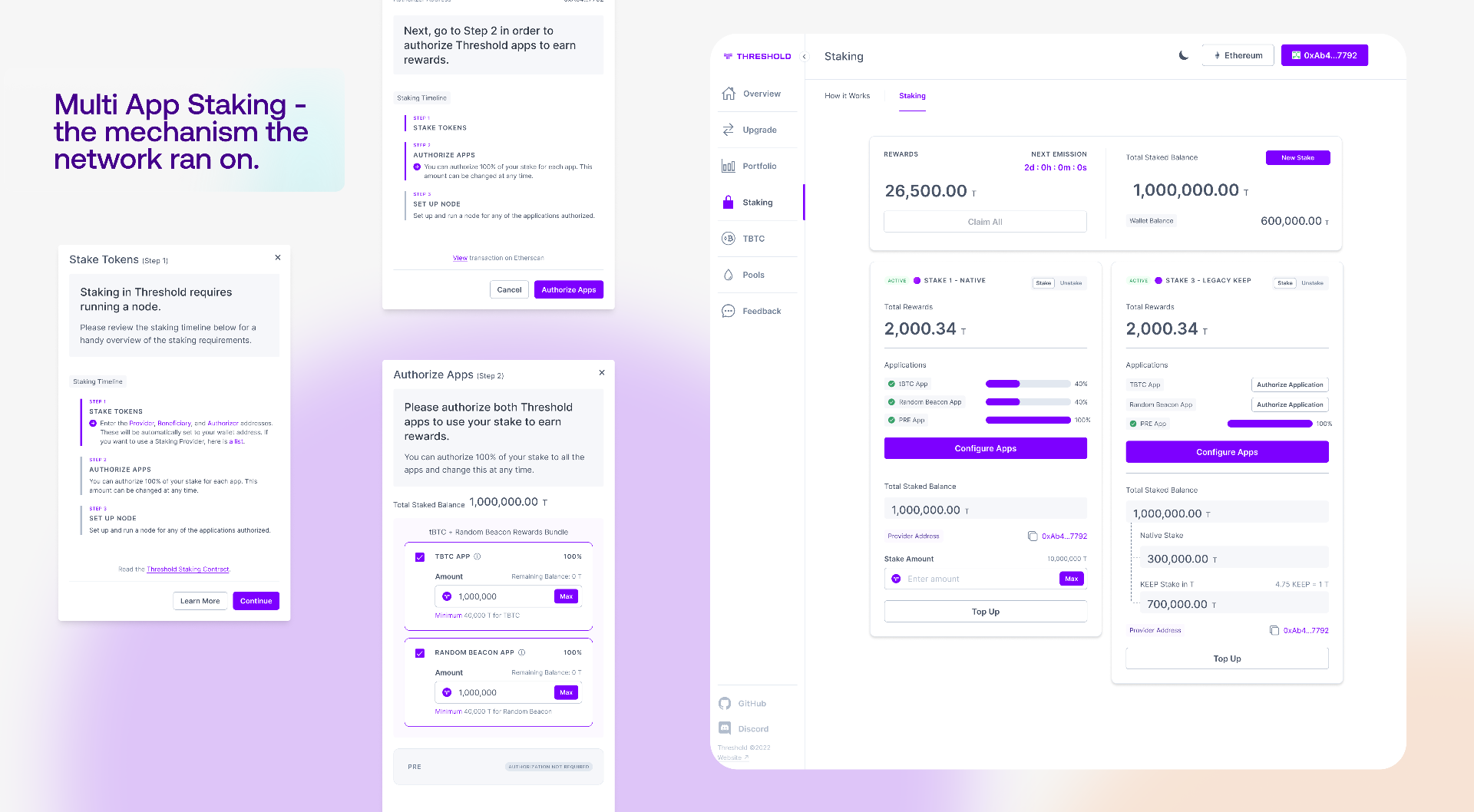
When Keep and NuCypher merged into Threshold, a staker’s tokens stopped backing a single job. The same stake could now be put to work across several independent applications on the network, each with its own duties and its own power to slash that stake if a node misbehaved.
That created a problem no staking interface I knew of solved well. A person had to decide how much of one stake to authorise to each application, understand that each app could penalise them independently, and manage that exposure over time. The novelty was not the applications themselves, which stakers already ran. It was authorising a single stake across several of them at once and holding a different level of risk in each.
Discovery
I led the design and research on this, and the most useful thing I learned came from being wrong. My first solution rested on an assumption I was confident in, that most stakers ran through a dedicated staking provider, so the address that owned the stake and the address that operated the node would belong to different people. The interface was built around that separation.
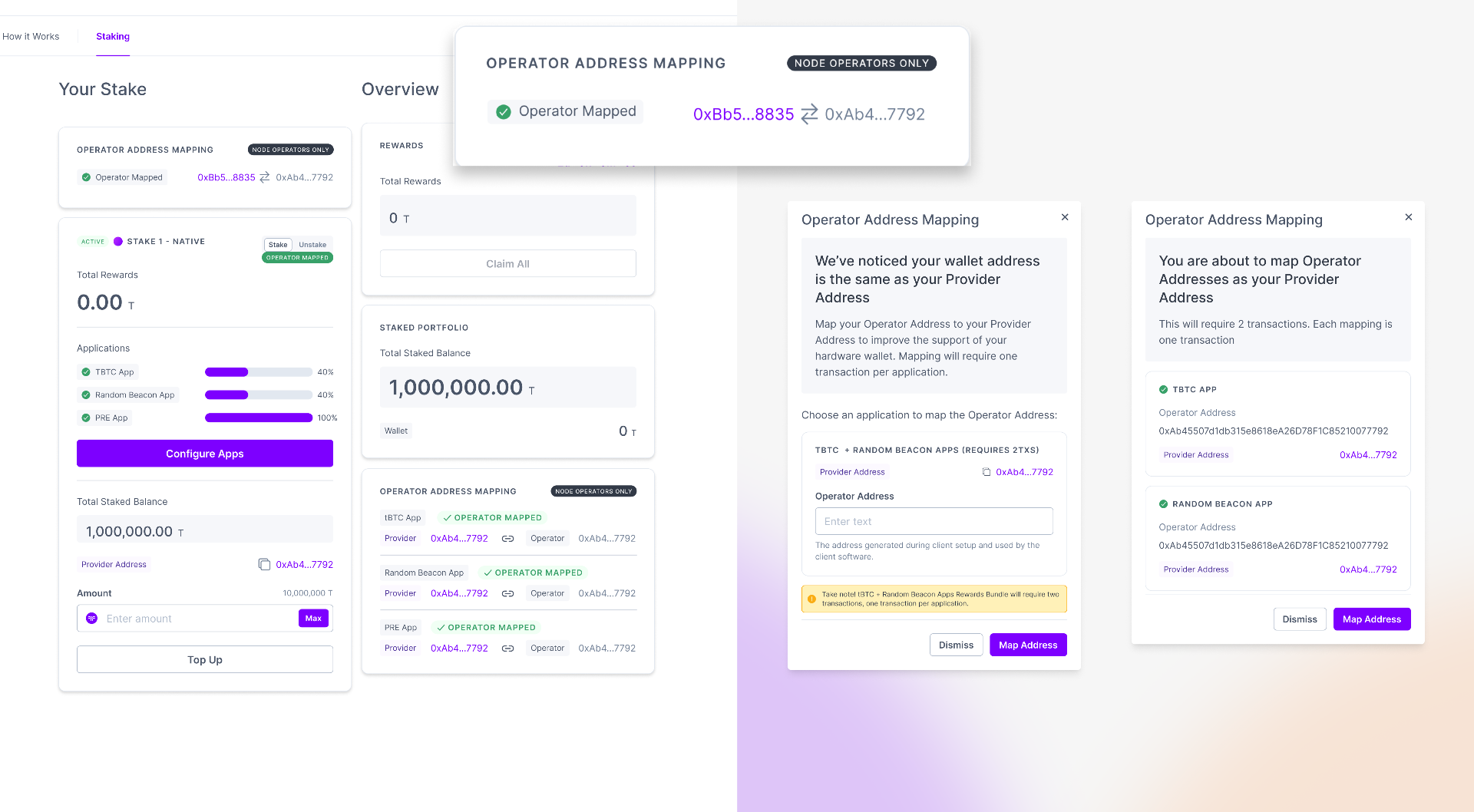
When I checked it against the real staker set, the assumption collapsed. 199 of 267 stakers used the same address for both roles, which meant the model I had designed around did not describe who these people actually were. That correction reshaped the product. Because so many stakers ran their own nodes, often from hardware wallets, I had to bring operator address mapping into the dashboard itself rather than pushing those users out to Etherscan or the command line to do something the product should own.
The second discovery was conceptual. The mechanism under multi-app staking is genuinely counterintuitive. You are not slicing a stake into portions. The same stake fully backs every application you authorise it for, and each application can slash up to the amount you grant it, so one hundred thousand tokens can be authorised in full to three different apps at once. That is powerful and efficient, and it is also easy to misread, since the natural assumption is that authorising more apps divides your stake rather than layering shared risk on top of it.
Solution
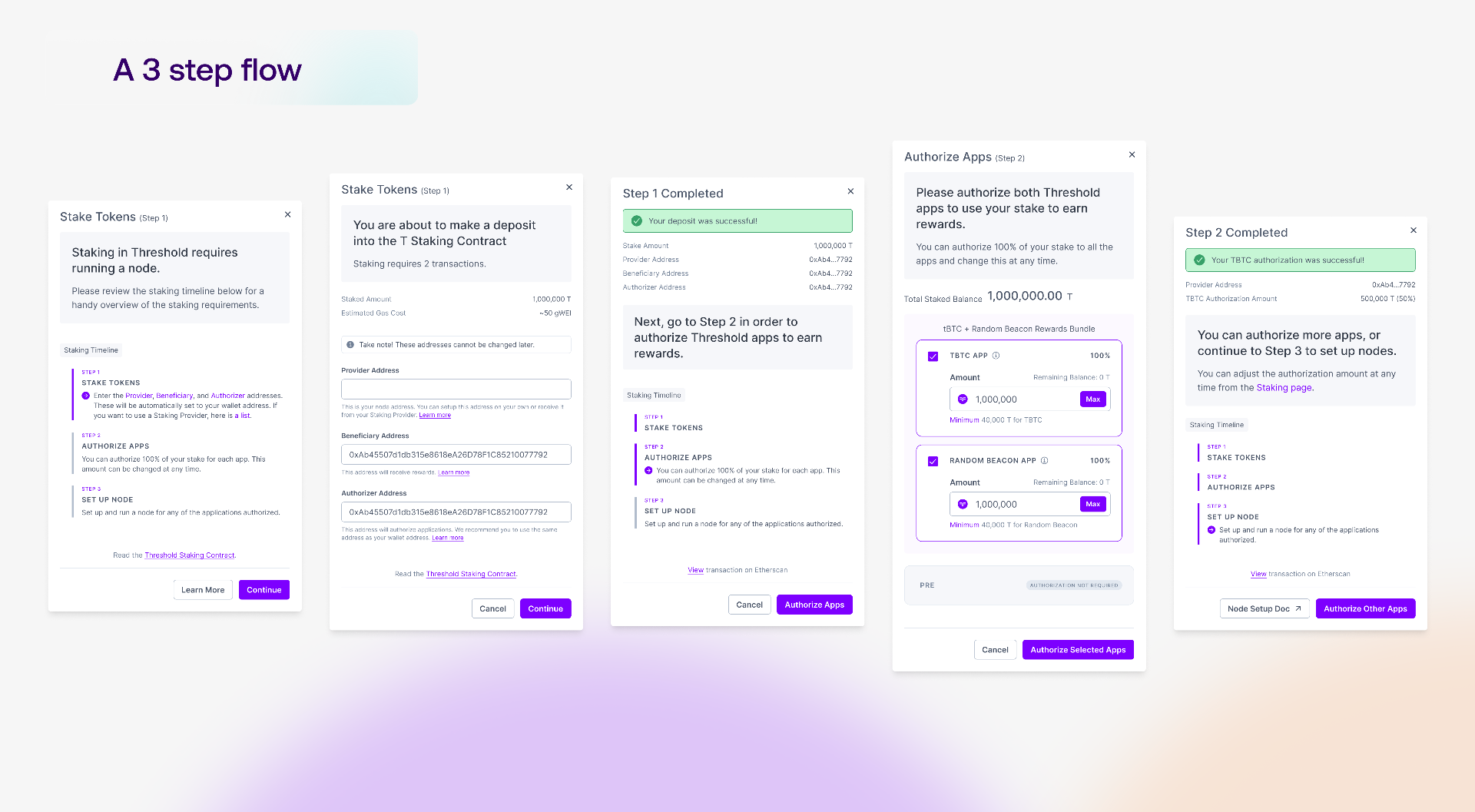
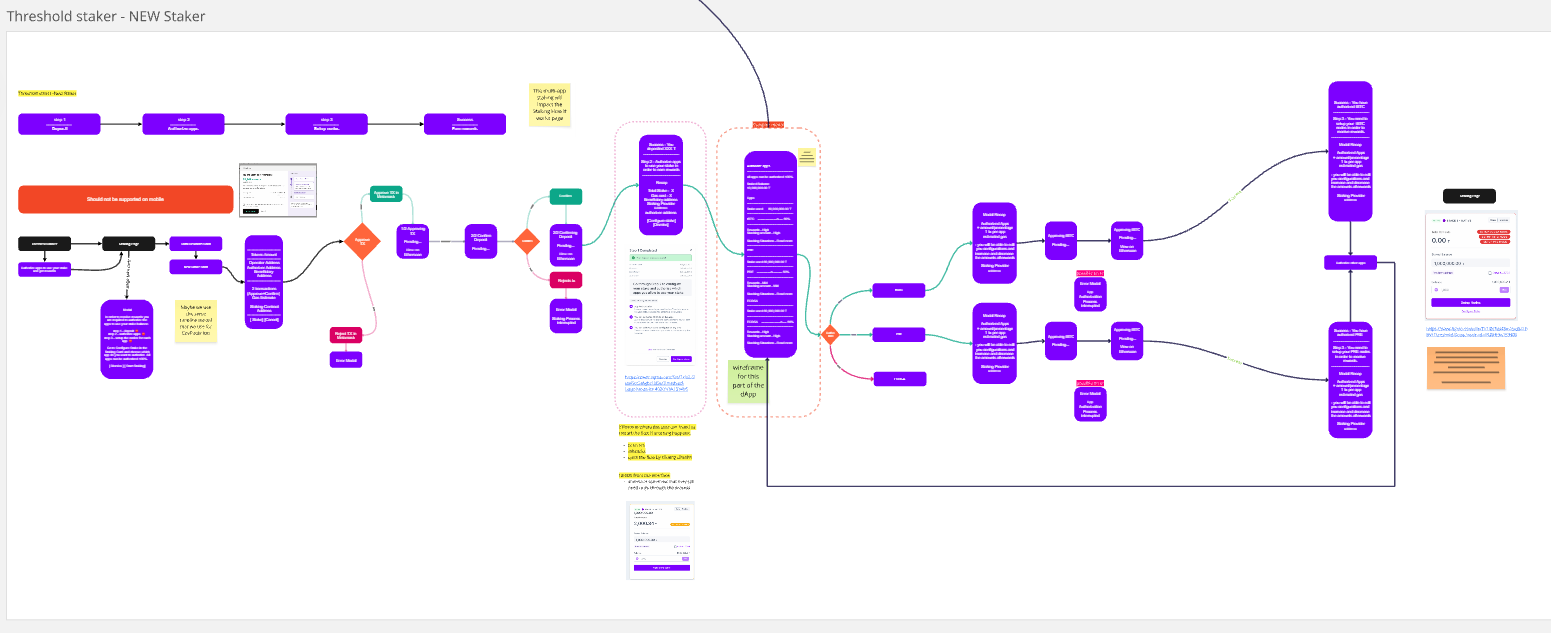
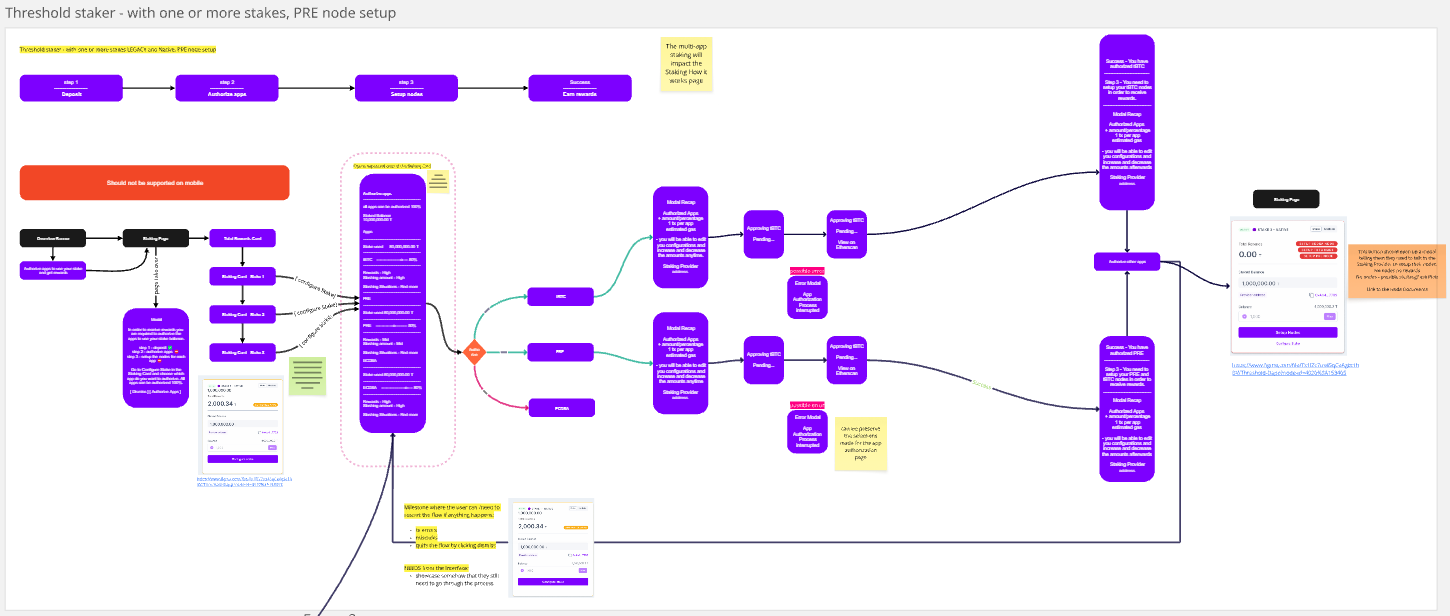
The design job was to make that layered-risk model legible and safe, inside a flow a first-time staker could actually finish. I led the work to a three-step spine:
→ deposit your tokens
→ authorise and configure how much each application can draw on
→ then set up the node.
I put node setup last on purpose, because it is a separate technical step, done on the command line and sometimes handed to a third-party provider, so a staker could commit their stake and set their per-app risk on the dashboard before touching any node infrastructure.
The heart of it was treating per-app authorisation as a risk control, not a form field. Setting how much an application could slash was really the staker deciding their exposure to that application, so the interface had to present it as a deliberate choice. I leaned on progressive disclosure to keep each step from overwhelming the user, and on recognition over recall so the state of each application, authorised or not, node running or not, lived on the cards instead of in the user’s memory.
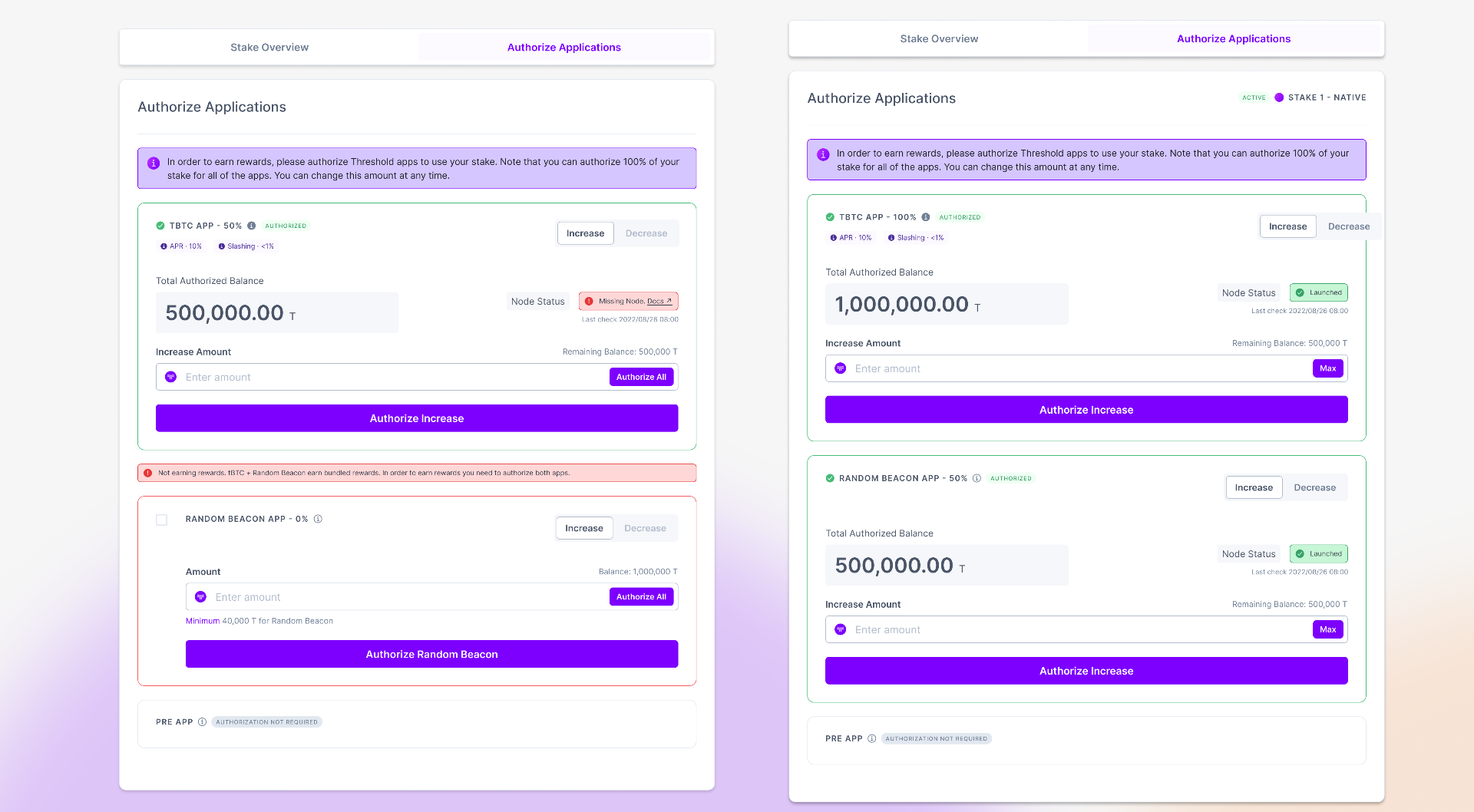
The authorisation step was where the counterintuitive model had to become something you could see and act on, not a concept to explain. Each application sat on its own card, and you set how much of your stake it could use, up to the full amount, with the minimum and your remaining balance shown right there.
Because the same stake could back every app at once, a staker could authorise their entire balance to tBTC and their entire balance to Random Beacon from one stake, and the interface showed exactly that instead of asking them to reason it out. PRE, which could not slash, was marked as not requiring authorisation, so no one spent a decision on it. The button that committed the choice read “Authorize Selected Apps,” naming what it actually did when only some apps were chosen.
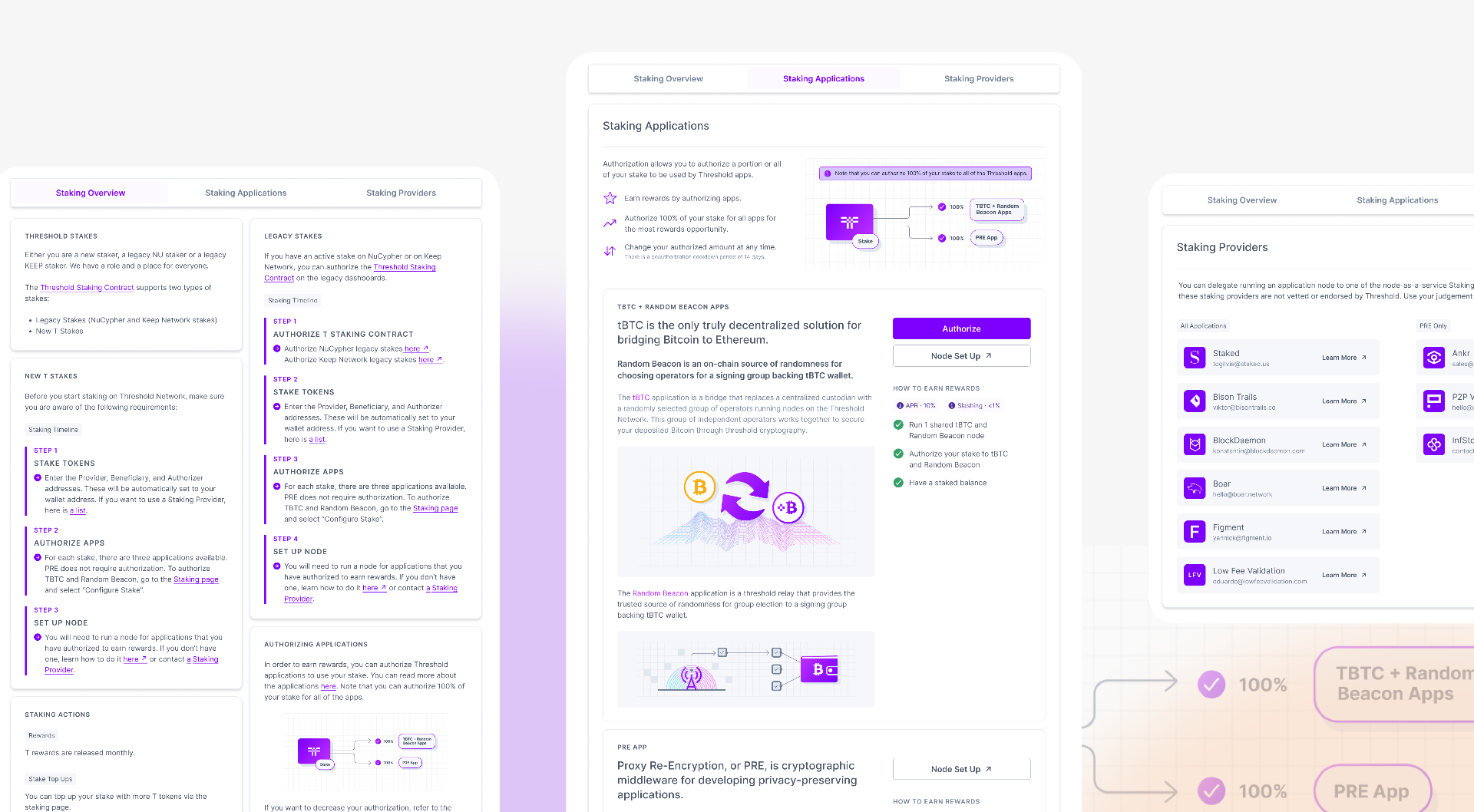
Risk could not be a blind, one-time commitment, so the ongoing authorisation view set each application’s reward beside its danger, its APR next to its slashing rate, alongside the node’s status. From there a staker could increase or decrease how much any app could draw on at any time.
That turned the frightening part, exposing real money to something that could take it, into a position a person could read and adjust with their eyes open, which for an interface handling money is the difference between trust and a leap of faith.
Outcome
Multi-app staking shipped as the second phase of the Threshold staking process. The result I stand behind is not a number I can honestly pin on the interface alone, so I will not borrow one. It is that the hardest thing in the product to explain became the mechanism the network ran on. Authorising a stake across applications was not a feature sitting beside Threshold, it was how Threshold worked, and stakers from both legacy networks came to do it through a single dashboard rather than two. Making a high-stakes, counterintuitive decision legible enough that people made it confidently, with real money, is the outcome I care about most.
Takeaway
What I carried forward is to pressure-test the assumption your whole solution rests on before you build on it. I was confident about how these stakers operated, I was wrong in a way that touched every screen, and I only found out because I checked against [TAKEAWAY ENDING TO CONFIRM]